Aug 5 • Global Solutions Education and Training Academy

The Mindset Shift From Information to Intentional Implementation in Virtual and Remote Workforce Development

Key Takeaways

  • Workforce development improves when training is built for follow-through, not just completion

  • The real goal is observable behavior change on the job, not exposure to information

  • Virtual learning sticks when you add simple routines that force practice and feedback

  • If you do one thing, define what “good” looks like in a real work task (a sales call recap, a ticket handoff, a patient intake note) and teach to that

  • Works best when learners can practice within 24 to 72 hours of the lesson, fails when content stays disconnected from their calendar and tools

  • If you’re short on time, skip extra modules and add a 10-minute weekly practice cycle plus an accountability loop with a manager or peer

When training feels complete but change never shows up at work

You ship a well-structured training, feedback is positive, and completion rates look strong. But two weeks later, the same errors show up in customer tickets, new managers still avoid hard conversations, and the dashboard barely moves.


A simple way to spot this gap is to compare two numbers: course completion versus one work metric you expected to shift (for example, time-to-resolution, QA score, sales call conversion, or rework rate). When the first number is high and the second stays flat, you did not fail at content. You missed what happens after learners close the last lesson.


Next, here’s the catch: without strategic reinforcement, transfer to the job often drops within weeks. People remember what to do, but work pressure, old habits, and unclear expectations win.

If you do one thing, make the course “end” with a required work output, not a final video. For example:

  • A support rep submits 5 real ticket rewrites using the new rubric

  • A team lead runs one 15-minute 1:1 using a provided agenda and shares notes

  • A new hire completes a live screen recording of the process in under 8 minutes

  • A salesperson records one call opener and gets manager feedback within 48 hours


That said, reinforcement is a tradeoff: it works best when tasks are small, time-boxed, and tied to existing workflows. It fails when it depends on extra meetings, vague “apply this” instructions, or managers who were never given a role.


A common mistake is treating reminders as reinforcement. A reminder says “don’t forget.” Reinforcement creates a moment where the learner must perform, get feedback, and adjust. In practice, aim for a 2-week runway after training with:


  • One on-the-job task within 24 to 72 hours

  • One feedback point from a manager, peer, or QA reviewer

  • One short follow-up check (10 minutes) to remove blockers

Make the mindset shift from content provider to implementation designer

Next, redefine what “success” means in your training. Instead of asking, “Did they finish the modules?” ask, “Can they do this consistently in real work, with real constraints?” Completion is a participation metric, but consistent performance is the outcome your managers and learners actually feel.


A common mistake is designing the course around what you can explain in 60 minutes rather than what someone must do on Monday morning. Fix it by starting with the job context first: the tools they use, the time pressure they face, and the decisions they make when no one is watching.


So pick 1–3 target behaviors for the next training cycle and define what “good” looks like in observable terms. If you do one thing, do this step, because it makes practice activities, coaching prompts, and assessment criteria obvious.


Use a simple definition format:


  • Behavior: what the learner will do (verb + object)

  • Context: where and when they will do it (tool, channel, scenario)

  • Quality bar: what “good” looks like (accuracy, time, completeness)

  • Frequency: how often it must happen to count as consistent


For example:


  • A remote support agent summarizes the issue and next step in the ticketing tool before closing with no missing fields in under 3 minutes, every ticket

  • A new team lead runs a 15-minute weekly 1:1 on video using a shared agenda and ends with one written commitment, each direct report, each week


If you’re short on time, skip adding more lessons and spend 30 minutes tightening these 1–3 behavior definitions. You can teach less content and still get better results if everyone knows exactly what “doing it well” looks like.

Diagnose where information breaks before implementation begins

Next, before you build anything new, find the exact spot where “they learned it” turns into “they never used it.” Most training failures are not about content volume. They come from a few predictable friction points that block action once people return to real work.


Start with a fast diagnostic across one role and one workflow (for example, a customer support team handling escalations or a sales team running discovery calls). Look for these friction points:


  • Low relevance: the examples do not match the real tickets, customers, tools, or deadlines

  • No practice: learners never rehearse the task in a realistic scenario within 10 to 15 minutes of learning it

  • Unclear ownership: nobody can answer who should do what, by when, and what “done” looks like

  • Weak manager support: managers do not reinforce the skill in 1:1s, standups, or reviews

  • Missing workflow fit: the new behavior requires extra steps or a separate tool, so it gets skipped under pressure


That said, don’t diagnose by satisfaction scores alone, because people can rate training “useful” and still not change behavior. Use implementation proof, meaning evidence that the behavior shows up at work, the outputs improve, and people get faster at doing it without help.


If you do one thing, track these core signals for 2 to 4 weeks after training with a small pilot group:


  • Behavior evidence: a checklist, call notes, screenshots, or observed steps that show the new behavior happened

  • Output quality: fewer errors, clearer documentation, better handoffs, or higher pass rates on real work samples

  • Time-to-competence: how long it takes a learner to do the task correctly twice in a row without prompts


Here’s the catch: implementation proof works best when the work is observable (tickets, calls, code reviews, QA checklists) and fails when the work is invisible or purely conceptual. If you’re short on time, skip broad surveys and run a 30-minute manager interview plus a quick artifact review (5 to 10 examples) to pinpoint the break.

Implement intentionally in virtual and remote learning environments

Next, treat remote training like a weekly operating rhythm, not a one-time event. If people only watch videos and pass a quiz, you may see completion rates above 80% but still get near-zero behavior change on the job.


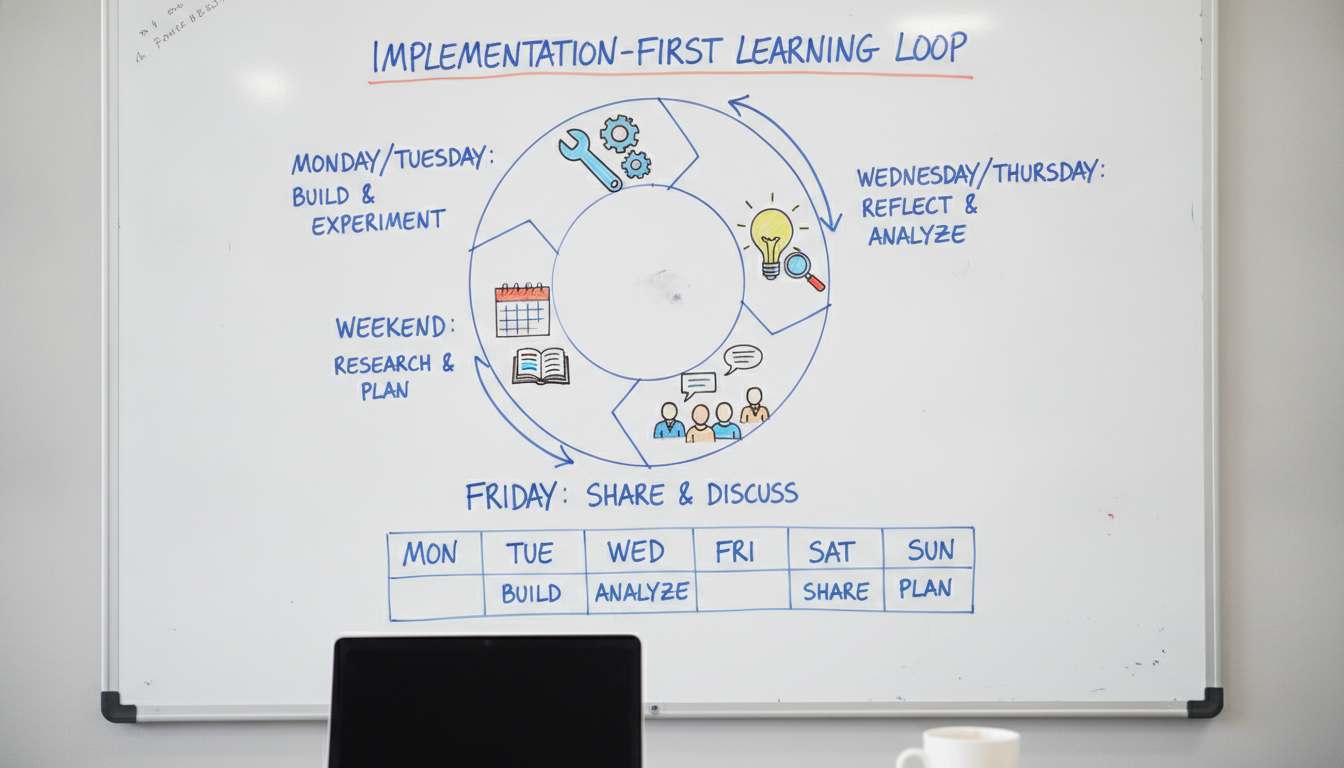
A simple pattern that works well online is a loop with a weekly cadence: learn, practice, apply, reflect, repeat. Works best when the job tasks are repeatable (customer calls, ticket handling, weekly reporting), and it tends to fail when the work is rare or high-stakes unless you add more practice time and coaching.


A practical weekly loop (30 to 90 minutes total) can look like this:


  • Learn (10 to 15 min): one concept tied to a real task and one example

  • Practice (10 to 20 min): short exercises in the LMS or in a live session

  • Apply (15 to 30 min): do the task at work and capture proof (a screenshot, a short write-up, a call note)

  • Reflect (5 to 10 min): one prompt on what worked, what broke, and what to try next

  • Repeat: the next week builds on the same task with a slightly harder scenario


Also, plan for the supports people usually get in-person, then make them obvious online. If you do one thing, give learners a job aid they can use during the task itself, not a summary they read once.

Implementation supports that fit virtual delivery:


  • Job aids: one-page checklists, templates, and “if this, then that” guides for common cases

  • Real-play simulations: role-based scenarios in breakout rooms, recorded voice notes, or written customer threads

  • Peer pods: groups of 3 to 5 that meet for 15 minutes weekly to compare proofs of application

  • Coaching: a 10-minute feedback slot every one to two weeks, focused on one observable behavior

  • Manager checklists: a short list of what to look for in the next 1 to 2 weeks and what to reinforce


Here's the catch: the most common mistake in remote learning is putting all the time in the live session and leaving application to chance. Fix it by scheduling the Apply step as a required deliverable, then making the Reflect prompt and manager checklist the follow-through that keeps the loop alive.

Connect personal, professional, leadership, and organizational development to the same outcomes

Also, behavior change sticks faster when every kind of development points to the same target outcomes, not separate tracks. If you do one thing, pick 1 to 2 work outcomes (for example: fewer rework cycles, faster ticket resolution, higher customer satisfaction) and map each development layer to what it will change this week.


This works best when outcomes are observable in day to day work, like “handoffs happen within 24 hours” or “every client call ends with clear next steps.” It fails when outcomes are vague, like “be more confident,” because nobody can tell if it happened.


Next, connect personal and professional development to real tasks using habit scaffolds, micro-commitments, and short reflection. A habit scaffold is a small cue that makes the next action easier, like a calendar block, a template, or a checklist you already open every day.


Try a simple loop tied to one task your learners already do:


  • Habit scaffold: add a 3 line prep template at the top of each meeting note

  • Micro-commitment: "For the next 5 workdays, I will use the template for the first meeting of the day"

  • Reflection: a 2 minute end-of-day check, "What did I do, what changed, what will I repeat tomorrow"


But personal effort usually dies if the environment keeps rewarding the old behavior. Leadership and organizational development should add accountability rhythms and incentives that reduce friction to the new behavior, especially in remote teams where nobody sees the work.


Common mistake: asking managers to “coach more” without changing their calendar or expectations. Fix it by making the rhythm small and concrete:


  • Weekly 15 minute review in the team meeting: one example of the new behavior, one blocker

  • A shared scoreboard with 1 metric (for example: percent of work items with a clear owner and due date)

  • Incentives that match reality, like recognition tied to the metric, not completion certificates

Closing remarks

Information is the start—intention and strategy make it stick.


So as you look at your next virtual cohort, ask a harder question than “Did we cover the material?” Ask “What will people do differently by Friday,” and “What proof will show up in their work?” If you do one thing, build the proof first, then teach only what supports it. Training should intentionally and strategically focus on education and development.


That said, the fastest way to redesign is to remove the parts that feel reassuring but do not change behavior. Pick one program and decide what you would stop teaching and start engineering next week, based on implementation evidence.


  • Stop teaching content learners can search in 2 minutes

  • Stop grading recall quizzes that never show up in work output

  • Start engineering 15-minute practice loops with clear success checks

  • Start requiring a work sample, a manager check-in, or a peer review within 72 hours

  • Start tracking one behavior metric for 14 days, not one completion rate


For additional information, training, tools, or resources contact us.
Created with